jQuery

elevateZoom (Requires jQuery)

Microsoft Store (Donation)


Facebook Messenger (Donation)


Many donors of this blog prefer to donate their money through Facebook Messenger!

Click here to go to this blog's Facebook Page!

Thank you!

Activation Code - Donation (Multiple Options)


Donate

Request Web\PHP\JavaScript\HTML Project !

Contact us if you want us to develop a Web\PHP\JavaScript\HTML project for you!

Advertise On This Blog!

If you want a Product\Service\Event to be advertised on this blog, feel free to contact us!

Ads (Reserved)

Tuesday, May 20, 2025

Bluetooth Speakers - Fix Auto Mute issue at Low Frequency Sounds (at Low Volume)


When the system volume is low and/or the player volume is low, Bluetooth speakers tend to auto mute because they receive low frequency sounds.

Fix 1
  • Use the physical buttons of the Bluetooth speaker device to lower the volume
  •  Set volume of the system and the player to 100%
  •  This way, the Bluetooth speaker device will receive high frequency sounds most of the time.

Fix 2
  •  Play any of the "Low frequency" audio files with a media player and set the player volume to 50% (may be enough or not) 
  •  The audio file "Low frequency _ Steel Mill.mp3" at 100% volume is almost inaudible and works fine.
  •  Enable repeat\loop in the player
  •  This will prevent the speaker to auto mute because it is always receiving the minimum sound frequency it can play.
  •  "Low frequency" audio files are almost inaudible (only at high volumes they may be audible)

Download 3 Low Frequency Audio files:
https://www.mediafire.com/file/3hx7n7f0bx4jzg6/3_Low_Frequency_Audio_Files.rar/file


Monday, April 21, 2025

[JavaScript] Real and Fake Multi-Thread. (Prevent Loop From Freezing The Browser)

The below codes are examples on how to prevent Loop from freezing the browser by using either Real or Fake Multi-Thread.

Since Real Multi-Thread is faster than Fake Multi-Thread, always use Real Multi-Thread if possible!

Test codes below (Click here)

Real Multi-Thread (Async Function with Web Worker):


Fake Multi-Thread (Async Function with Sleep):


Saturday, November 16, 2024

[JavaScript] Wait Return Value from Async Functions


Test code below (Click here)


Friday, November 15, 2024

[JavaScript] Wait Sleep() Function


Test code below (Click here)


Wednesday, November 1, 2023

[JavaScript] Save and Load File. (Text, Image, Audio and Video)


v1.0 Save - v1.2 Load:

- Audios and Videos can be loaded now.

v1.0 Save - v1.1 Load:

- Added "Shrink" option to reduce the image base64 data by using CSS "max-width" or "max-height" properties.

Test code below (Click here)


More examples on getting src (source):

Sunday, September 17, 2023

[JavaScript] Get Locale HourCycle (Hour Format)[ChatGPT]


Wow! ChatGPT helped me create a JavaScript code that I couldn't find while searching on Google!

The code returns the locale HourCycle (Hour Format).

This is Fantastic indeed!

Test code below (Click here)

Friday, September 15, 2023

[HTML - CSS] Prevent Table Cell Width To Fit Its Content!


Test code below (Click here)

Tuesday, July 18, 2023

[HTML - CSS] Vertical Center (Center Vertically)


Test code below (Click here)

Thursday, September 15, 2022

[JavaScript] Random Codes Generator! (Function)


www.StraightTips.blogspot.com


Length =

Random_Code(Function) v1.0: Test code below (Click here)


Friday, September 9, 2022

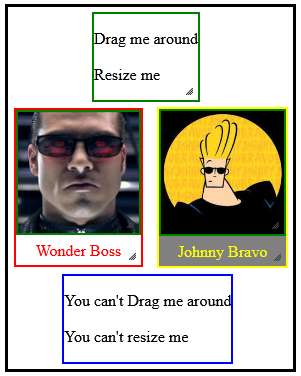
[JavaScript] Drag-Move and Resize any element with jQuery!


Test code below (Click here):


Tuesday, September 6, 2022

Simple Online HTML Editor with Note Box!


For a more advanced "Note Boxes + Offline Html Editor" (Click Here)


Thursday, August 25, 2022

Online Text Crypter - Encrypt\Decrypt Messages In Real Time!


"Cryption Key" can either be Password, Passphrase, Passcode, etc!


Wednesday, April 27, 2022

Create MSI, EXE, MSIX or APPX installer for a Portable App and Submit to Microsoft Store! (Advanced Installer)


First of all, yes, Microsoft makes it hard to impossible for developers to submit and publish their apps at Microsoft Store!

Saying that, the most important thing to know is, for traditional Win32 Apps, developers should\must submit "MSI" or "EXE" installers, otherwise, developers should submit "MSIX" or "APPX" installers!

Unfortunately, most traditional Win32 Apps from "Microsoft Web Store", in which are installed with "MSIX" or "APPX" packages, tend to don't work properly, that's why most developers don't make their traditional Win32 Apps available at "Microsoft Web Store"!

Alternatively, traditional Win32 Apps can be submitted to "Microsoft App Store", in which allows traditional Win32 Apps to be installed with "MSI" or "EXE" packages, allowing them to work properly and as intended!

Microsoft Web Store: https://www.microsoft.com
Microsoft App Store: https://apps.microsoft.com

Unfortunately, although "MSI" and "EXE" apps can be marked as "Paid", the price can't be set and developers can't sell them directly from Microsoft Store!

To know more, download all the files from the above video through the link below:
https://www.mediafire.com/file/d739h1jcpsi82q2/Submit_App_to_Microsoft_Store.rar/file

#AdvancedInstaller Advanced Installer
#MSI #EXE #MSIX #APPX #Installer
MSI EXE MSIX APPX Installer


Saturday, April 9, 2022

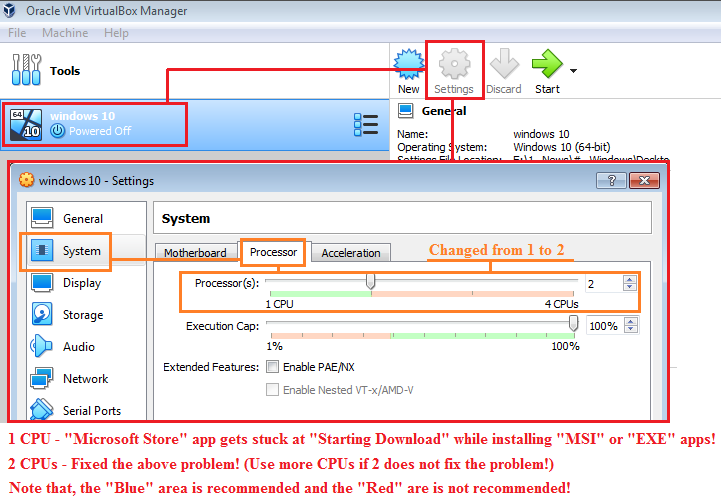
Fix for "Microsoft Store" app getting stuck at "Starting Download" while installing "MSI" or "EXE" apps in virtual machines like VirtualBox!


Windows 10, and probably Windows 11 as well, requires 2 or more CPUs core to work properly!

Virtual machines software like VirtualBox use by default only 1 CPU core, which may cause all kind of problems we can and can't imagine, including "Microsoft Store" app getting stuck at "Starting Download" while installing "MSI" or "EXE" apps!

2 CPUs core may be enough to fix such problems, but more can be used if necessary! (Don't use more CPUs core than the one recommended by the virtual machine software!)

"MSI" or "EXE" apps examples available at "Microsoft Store" app:

- Keyboard and Mouse Locker
- PdfClerk (msi)
- InstallAware
- Avast
- AVG

If "Microsoft Store" app can't find or install traditional "MSI" or "EXE" Win32 apps, it means that the "Microsoft Store" app itself needs to be updated!

Make sure the Windows OS is using at least 2 or more CPUs core, otherwise, "Microsoft Store" app may get stuck at "Starting Download" while installing "MSI" or "EXE" apps! ("MSConfig" can be used to check or set the number of CPUs core that the Windows OS can use!)


Friday, March 11, 2022

Oops, Tom Cruise Was Caught!!!


Well, one thing to learn from this "Craziest Drug Bust Ever" is that "Biometrics are identity, not security" (Twitter: @dragonshardz)!

That's why password managers like "JEMPass" must be avoided at all costs!

Another reason to avoid password managers like "JEMPass" is that, you can't change your finger, eyes or face if your biometric data get stolen or breached!

Yes, password managers like JEMPass are The Worst!

As an alternative to JEMPass, we recommend "Multi One Password", a "Real" and "The Most Secure Password Manager" because it does not store passwords neither locally in the users devices nor in the cloud! (Click here!)


Thursday, December 16, 2021

[HTML] Hide Elements From Print!


Saturday, October 30, 2021

The Best Protection For Your Email Account!


Believe it or not, the best protection for your email account is to not make its "main email address" public by any means, only you should know about its existence!

The "main email address" should be used only to login into your email account, never share it with nobody, never use it to sign up or create accounts in websites, etc!

In the other hand, create 1 or multiple "alias email address\es" in your email account and use it\them to share with people, sign up or create accounts in websites, etc!

Finally, always make sure that none of your "alias email addresses" have the permission to login into your email account!

That's it! If hackers don´t know the door to your email account, so they can't try any keys!


Thursday, October 28, 2021

Android - Move Files and Folders Instantly!

The Cut\Paste in the Android built-in file manager is slow! It actually does not "Move" the files\folders, it creates new ones by copy\pasting the old ones to the new location, then it deletes the old ones from the old location!

So basically, Cut\Paste = Copy\Paste\Delete, in Android built-in file manager! (Which is absurd and ridiculous!)

In the other hand, if you want Cut\Paste to move files\folders fast and instantly, you can use 3rd party file manager apps like "FX File Explorer"!

The Cut\Paste from "FX File Explorer" works as intended, it does not create new files\folders, it just changes the location of files\folders that already exist to a new location!

FX File Explorer (Google Play Store)


ADS - Multi Share Calculator

https://windowsportableapps.blogspot.com/2019/03/multi-share-calculator.html